
The plans
Each monthly plan comes with a set number of credits every month. If you run out mid-month, you can buy extra credits as a one-off top-up.
- Starter: 1,000 credits for $29/month
- Growth: 3,000 credits for $79/month
- Scale: 8,000 credits for $199/month
- Extra credits for paid plans: any amount from $5 to $500 once, at 25 to 33 credits per $1
Change your plan
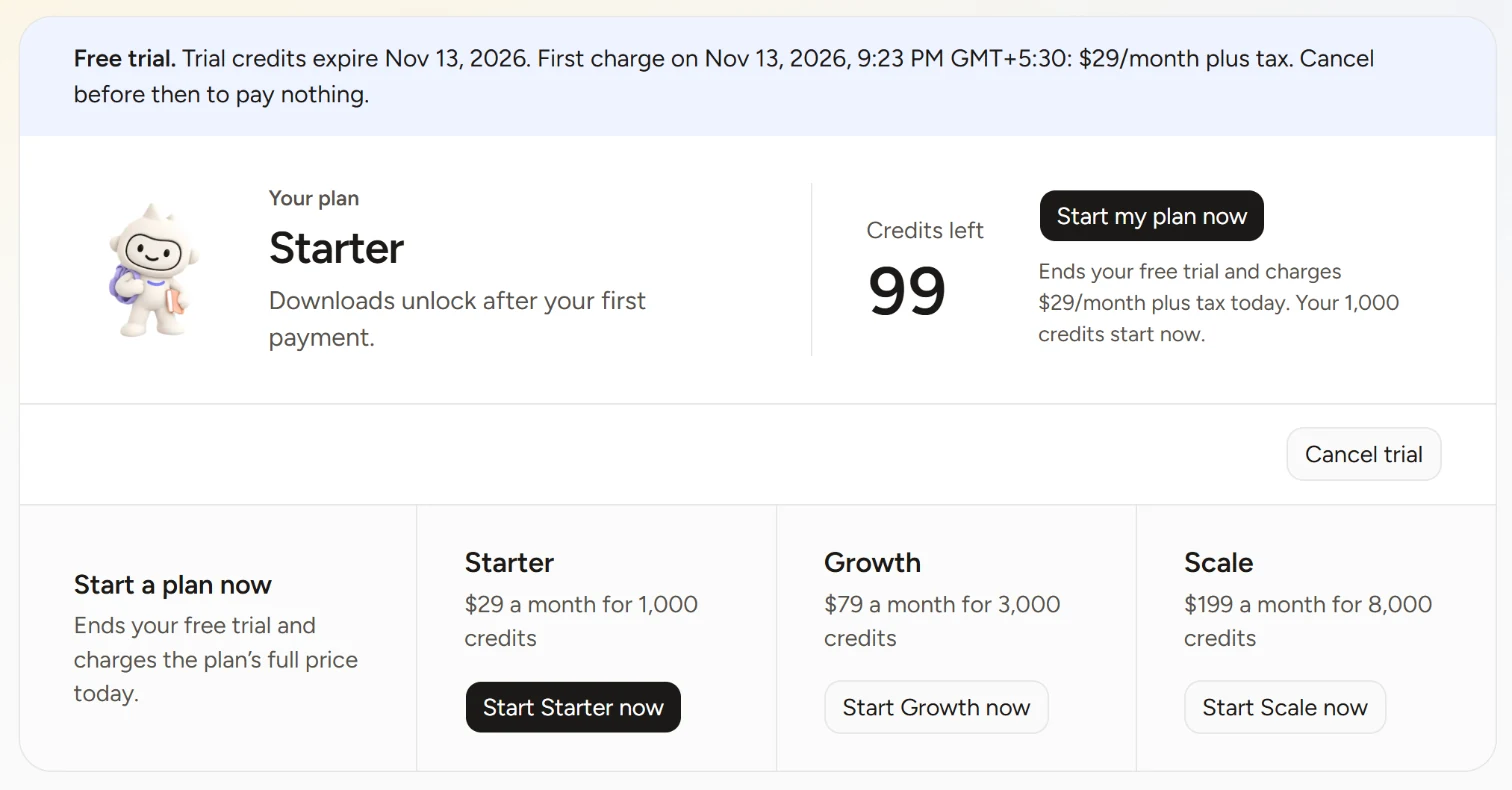
In Settings → Plan, the other plans sit at the bottom of your plan card. The review shows what you'll pay before anything changes.
Upgrade now moves you to a bigger plan today. You pay its full price, get its full credits, and a new month starts.
Credits left from your old plan stay until your old month would have ended.
Switch next month moves you to a smaller plan. Nothing is due that day. Your current plan carries on until your next billing date, then the new one starts.
To undo a scheduled switch, use the Keep button with your current plan's name, such as Keep Growth.
During a free trial, Start my plan now ends the trial and starts your plan today. You pay now, get the plan's full credits, and any trial credits left are removed.
Cancel your plan
Use Cancel plan at the bottom of Settings → Plan. Your plan and its credits stay until the paid month ends, and nothing renews after that date.
When the plan ends, all its credits end too. If your plan ends, extra credits end with it.
During a free trial the button is Cancel trial, and the plan you picked is never charged.
Cancelling stops future payments. To get money back for a past payment, ask for a refund as well.
Refunds
A plan payment can be refunded if you ask in time and haven't used what it paid for. These are the rules.
- First plan payment: refund within 7 days.
- Renewals: refund within 3 days.
- Only if that payment's credits are unused and nothing was downloaded since.
- Cancel any time. Your plan stays until the paid month ends.
- Extra credits: refunds only for a duplicate or wrong charge, or where the law requires one.
If a plan payment fails
CrowdYeti pauses the plan until a payment goes through. Your plan credits are kept, and runs can use them again once the plan resumes.
Use Fix payment in Settings → Plan to update your card. A workflow that was running stays paused, with its progress saved, until then.
Questions people ask
Can I buy extra credits on a monthly plan?
Yes. Use Buy credits in Settings → Plan and pay any amount from $5 to $500. Bigger top-ups get more, up to 33 credits per $1.
You can buy extra credits once your plan’s first payment goes through. Extra credits carry over while your plan runs, up to 12 months. If your plan ends, extra credits end with it. Plan credits are used first.
Can I buy extra credits during my free trial?
No. Extra credits are for paid plans. If your trial credits run out, or you want to keep going sooner, use Start my plan now in Settings → Plan.
How do I ask for a refund?
Use the contact page. Include your account email and the payment or invoice number, and never your card number.
Approved refunds go back to the card you paid with.
What happens to my credits when I cancel?
Your plan and its credits stay until the paid month ends. After that date the plan stops renewing.
Next step
The refund policy has the exact time limits and what happens to credits after a refund.
Read the refund policy