

Paste a video link to see its first 100 comments. Download them as a CSV that opens in Excel.
What you get
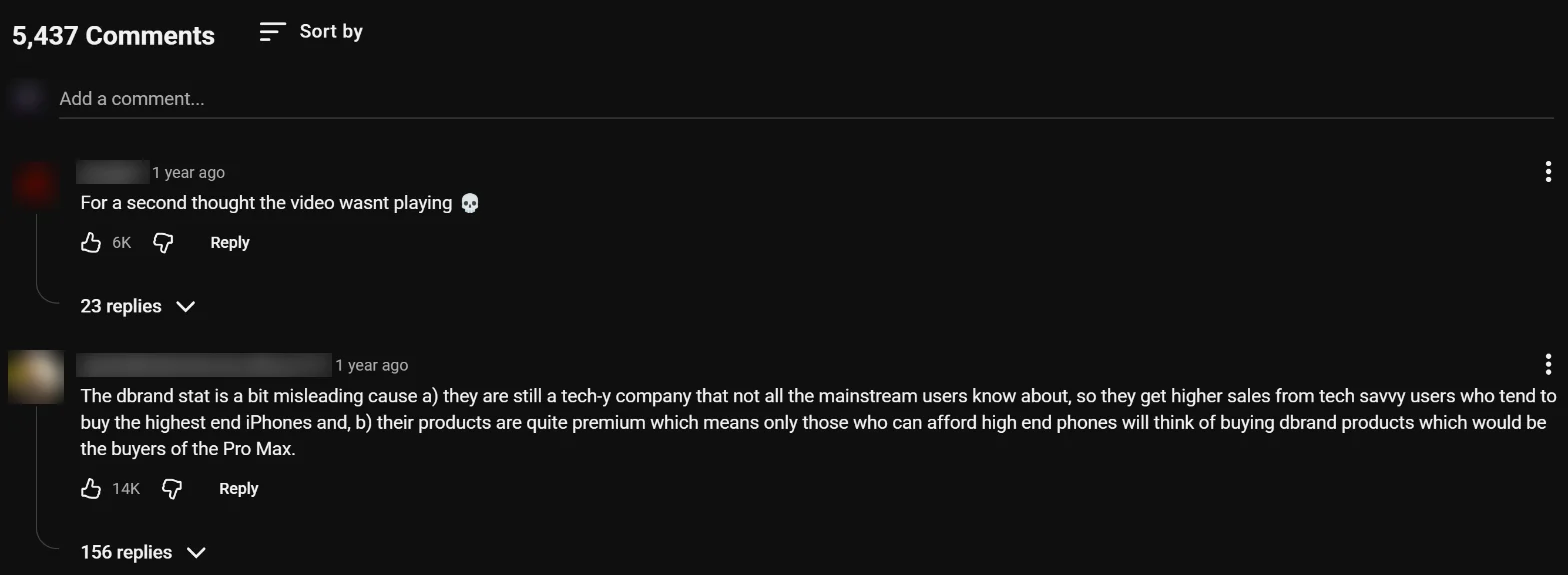
We opened MKBHD's iPhone 17 Pro review, which shows 5,437 comments. 15 of them had loaded, and Ctrl+F for battery found nothing.
YouTube Studio has a comment search for videos on your own channel. Its help page says it can't find comments from a specific user.
So we saved the video's comments with the Video comments Scout and searched them in CrowdYeti. Every search after that was free, because the comments were already saved.
We ran every CrowdYeti test on this page on 29 Oct 2026.
Step by step
- Save the comments: Open the Video comments Scout, paste the video link and pick how many comments you want. One run takes up to 2,000, and replies count toward that number.
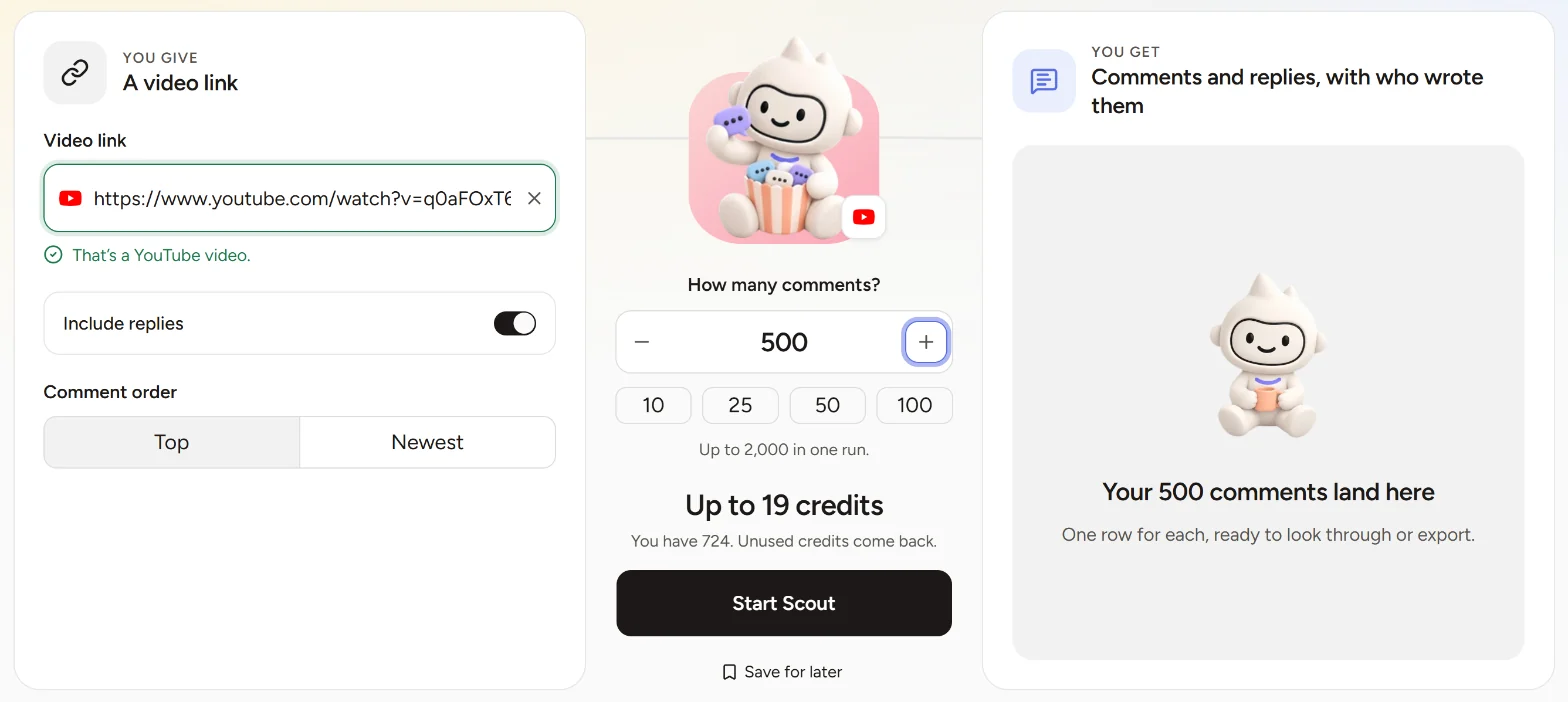
We asked for 500 comments from MKBHD's iPhone 17 Pro review. The form said up to 19 credits, and the run used 17. Tap the picture to open it full size. - Search for a word: When the run finishes, open it in Data and type your word into Search these results. It looks through every saved comment, reply and author name.
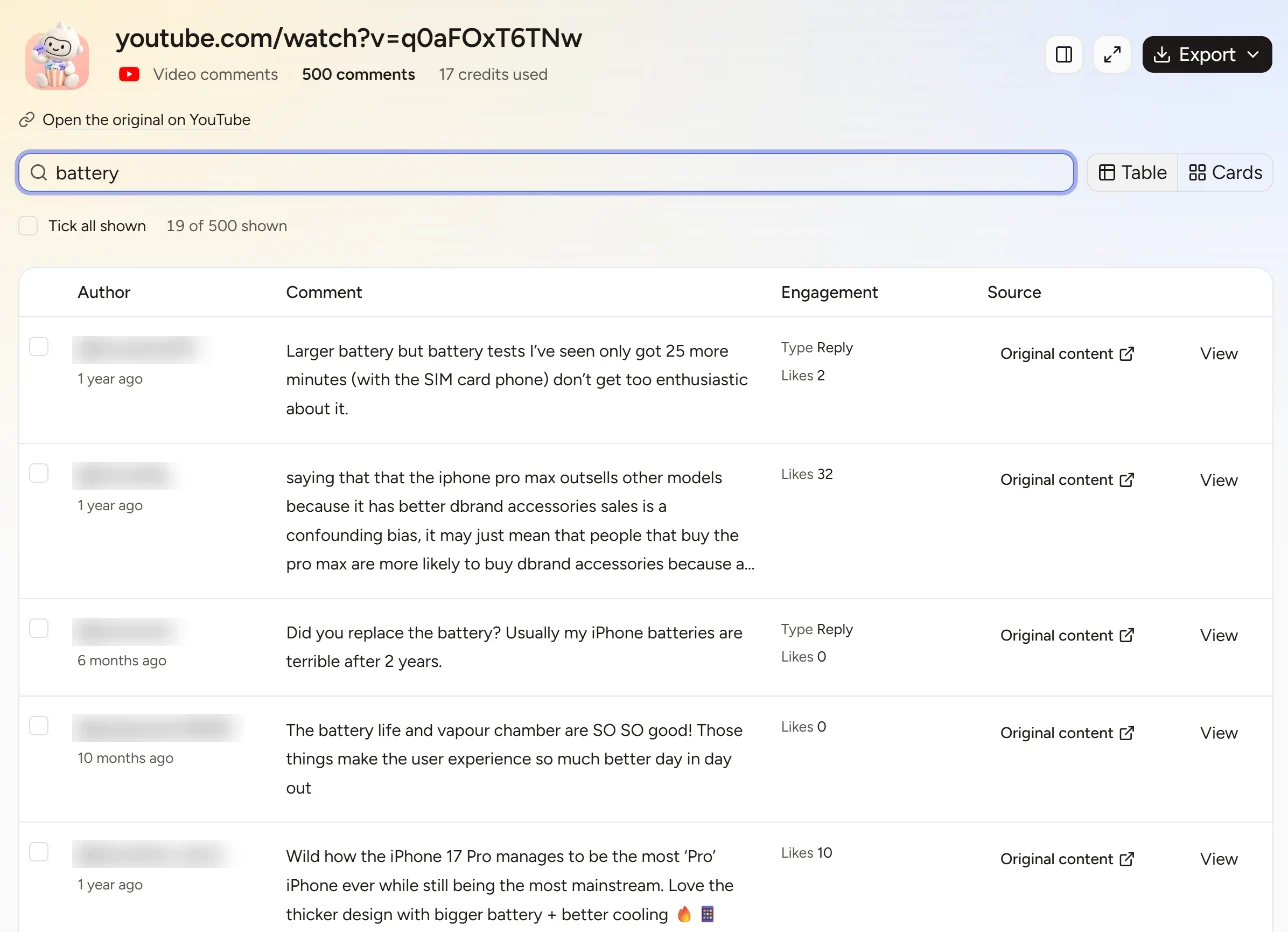
19 of our 500 comments and replies mention "battery". We blurred the names. Tap the picture to open it full size. - Search for a person: Type the first part of their username, without the @. Stop before any dash or underscore. The search splits the name there, and the second half can match other people.
- Download only the results: Choose Tick all shown and Export ticked, then pick CSV or JSON. With more than 50 results, choose Load more results before ticking. Downloads unlock after your first payment.
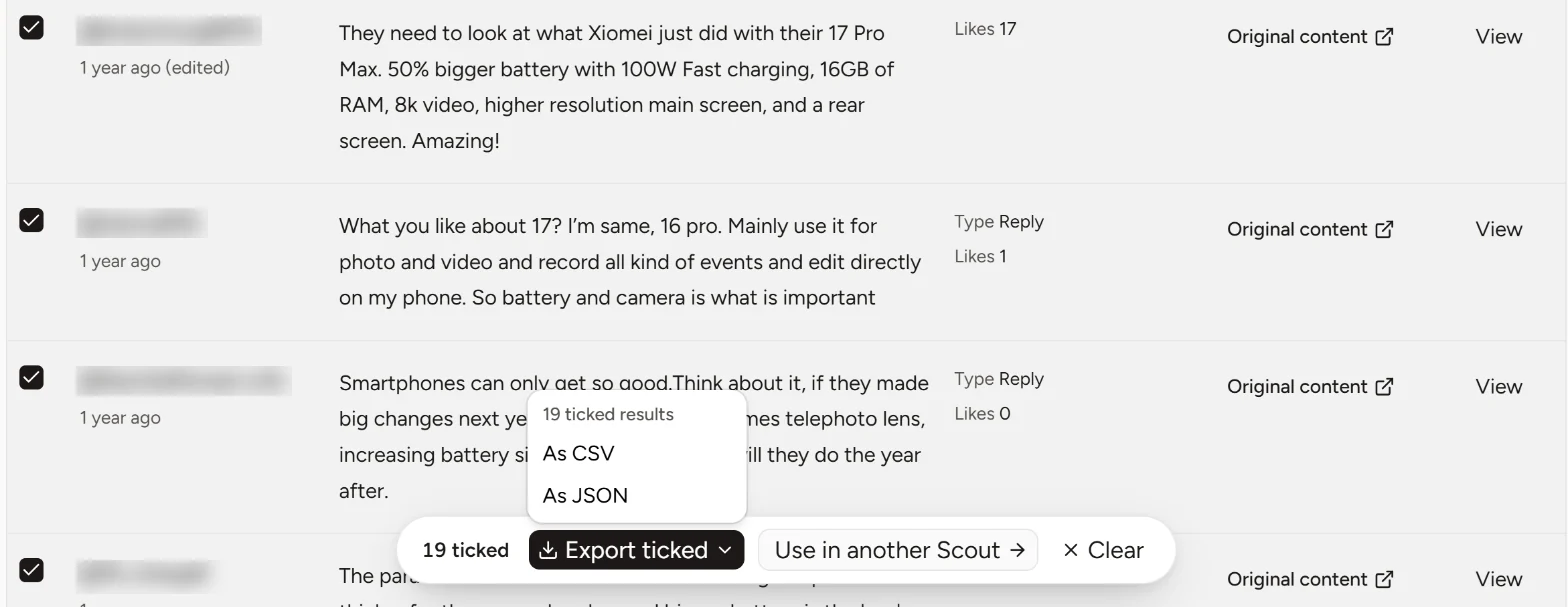
We ticked the 19 battery comments and downloaded a CSV with exactly those 19 rows. Tap the picture to open it full size.
What a real run returned
| We searched for | Results | What they were |
|---|---|---|
| battery | 19 | Comments and replies that use the word battery |
| dbrand | 20 | Mentions of dbrand, a phone case company |
| camera | 19 | Comments about the camera |
| batt | 19 | The same 19 as battery, because the start of a word is enough |
| battery life | 23 | Comments with battery or life in them, so 4 more than battery alone |
| arjun | 3 | All 3 replies from one commenter whose username starts with arjun |
| Ctrl+F for battery on YouTube | 0 | Only 15 of the 5,437 comments had loaded |
Good to know
- "batt" finds "battery", since the search matches the start of words. Letters in the middle of a word don't match, so "2026" missed "in2026" in another run.
- With two or more words, you get comments that contain any of them, and adding quotes doesn't change that. Searching for one uncommon word works best.
- Spelling has to be right. In a 2,000-comment run, "kahoot" found 2 comments and "kahot" found none.
- Results are listed by how closely they match your search. There's no option to sort them by likes or date.
- The search also looks at author names. Of the 10 results for "scratch", one was there only because the commenter's name starts with scratch.
- One run saves up to 2,000 comments and replies from one video. On a video with 5,437 comments, your search covers the 2,000 you saved.
- The Scout saves public comments only. Comments that are held for review, hidden or deleted won't be in your results.
- CrowdYeti deletes saved results after 12 months, so download anything you want to keep.
Other ways to do this
| Way | Cost | What it searches | By username | Best for |
|---|---|---|---|---|
| Ctrl+F on the video page | Free | Only comments that have loaded. Our review showed 15 of 5,437 at first. | Only on loaded comments | A small comment section |
| YouTube Studio | Free | Comments on your own videos, with filters such as questions | No. Its help page says you can't search for comments from specific users. | Moderating your own channel |
| Your comment history in Google My Activity | Free | Public comments you wrote | Only your own | Finding a comment you left |
| YouTube Data API | Free within 10,000 quota units a day. Needs an API key and code. | searchTerms returns comment threads with your words, up to 100 per call | No author filter | Developers |
| Hadzy | Free, no account. CSV export stops at 250 rows unless you back it on Patreon. | One video's comments and replies | Yes, by author name | A quick free search |
| YCS browser extension (Chrome, Firefox) | Free | The open video's comments, replies, chat replay and transcript | Yes | Searching while you watch, on a computer |
| CommentShark Comment Finder | Free | Up to 1,000 comments per video, or 2,000 signed in | No. Keyword, phrase or @mention. | A one-off keyword search |
| Keywords Everywhere YouTube Comment Finder | Free, 10 lookups a day, or 20 signed in | 500 comments per lookup | Yes, by commenter name | A quick check |
| CrowdYeti free YouTube comment downloader | Free, with no account. 30 lookups a day, or 100 signed in. | A video's first 100 comments, top or newest | Yes, any part of the name | A quick search of one video's top comments |
| CrowdYeti Video comments | 17 credits for our 500. Monthly plans from $29/month. | Up to 2,000 comments and replies per run, saved so you can search again for free | Yes, from the start of the username | Downloading only the comments you searched for |
Questions people ask
Is there a search bar for YouTube comments?
No. Under a video, viewers can only sort comments by Top or Newest.
The mobile app shows Comment topics on some very large comment sections. YouTube's AI groups the comments by theme, and you can't type your own search.
Creators can search comments on their own videos in YouTube Studio.
How do I find a specific comment on a YouTube video?
Keep scrolling until no more comments load, and open the replies you want to check. Then press Ctrl+F, or Cmd+F on a Mac.
YouTube loads comments as you scroll, and Ctrl+F only searches what has loaded. On a video with thousands of comments, that's a lot of scrolling.
If you save the comments with CrowdYeti first, one search covers every saved comment and reply.
Can I search YouTube comments by username?
Yes, within one video. In CrowdYeti, type the first part of the username without the @. In our test, "arjun" found all 3 replies from one commenter.
Stop before any dash or underscore. When we typed that commenter's full name, dash included, we also got 2 replies from someone else.
Hadzy, YCS and Keywords Everywhere can also filter one video's comments by commenter name, which YouTube Studio can't do.
Can I find all comments by one person across YouTube?
Only your own. YouTube doesn't list another person's comments anywhere, and the YouTube Data API can't filter comments by author.
Tools with a user search only look through the videos you give them, one or a few at a time.
For one channel, the Listen to a channel's audience template collects comments from up to 10 of its videos. Download the file and filter the Author column.
How do I find my own YouTube comments?
Open your comment history in Google My Activity. It lists the public comments you wrote, and it has a search bar.
Comments on deleted videos, and comments YouTube removed, aren't listed.
CrowdYeti can't help here, because it collects comments from the videos you give it.
Does the search include replies?
Yes, if you leave Include replies on. Replies are saved and searched the same way as comments, and 278 of our 500 results were replies.
The Scout saves about 10 replies per comment at most, so a longer thread on YouTube will have replies that aren't in your results.
Can ChatGPT or Claude search a video's comments?
They can't reliably load a video's comments from its link, because YouTube adds comments as you scroll.
Download the comments as a CSV instead, all of them or only your search results. Upload it to ChatGPT or Claude and ask what people say about the battery.
In CrowdYeti, an AI step in a workflow can label each comment, for example as Question, Complaint or Praise. Check a few labels before you rely on them.
How many comments can I search?
Up to 2,000 comments and replies from one video in each run. If the video has more, your search covers the 2,000 the run saved.
The run stays in Data for 12 months, so you can come back and search it again without spending credits.
Can I search comments by date?
No. Dates are saved the way YouTube shows them, such as "1 year ago", so there's no date range to pick.
If you need exact dates, the YouTube Data API has them.
Is there a free way to search YouTube comments?
Yes. Ctrl+F, YouTube Studio for your own videos, Hadzy, the YCS extension and CommentShark's Comment Finder are all free, each with the limits in the table above.
Saving comments in CrowdYeti costs credits. Our 500-comment run used 17. Monthly plans start at $29/month. Searching what you've saved is free.
Monthly plans start with a 3-day free trial. Card needed. Downloads unlock after your first payment.